
No products in the basket.
Using Zotero with Obsidian: Step-by-step guide (including plugins)
Optimise your academic work! Learn how to connect Zotero to Obsidian, set up the plugin, and import your first note.
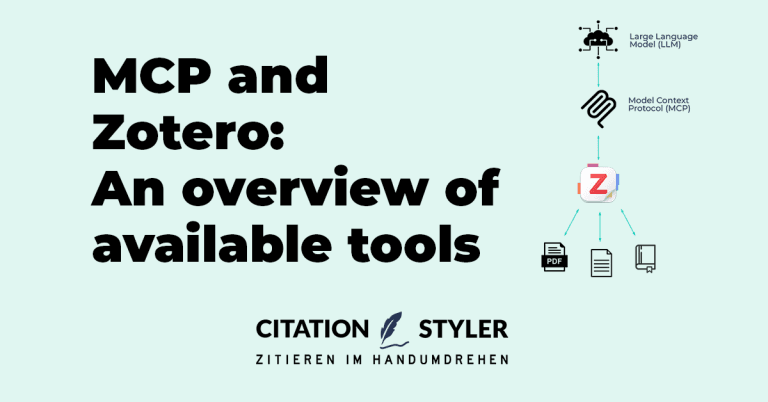
The Model Context Protocol (MCP) is an open protocol that provides AI applications with a standardised interface to external data sources. In the context of Zotero, this means that an AI assistant such as Claude, ChatGPT or Gemini can search your library, extract metadata, analyse PDFs and, depending on the project, also assign tags, create collections or generate Word documents with embedded Zotero citations. Instead of manually copying out references, you simply ask the AI a question, and it works directly with your library.
Anybody who's interested in AI functionalities inside von Zotero interessiert findet dazu einen eigenen Überblick in unserem Artikel AI plugins for Zotero. This article, however, focuses on the MCP interface, i.e. the connection between Zotero and external AI assistants.
Mittlerweile gibt es eine ganze Reihe solcher Projekte. Die Ansätze unterscheiden sich aber: Manche laufen als externe Python- oder Node-Server, andere sind Zotero-Plugins, die den MCP-Server gleich mitbringen. Einige arbeiten nur lesend über die Zotero-Web-API, andere greifen direkt auf die lokale SQLite-Datenbank zu oder nutzen die interne Zotero-JS-API für vollen Schreibzugriff. Auch bei der semantischen Suche reicht das Spektrum von „nicht vorhanden“ über „optional mit OpenAI-Embeddings“ bis hin zu lokalen Offline-Modellen.
Below, we outline all current Zotero MCP projects, along with their respective strengths, limitations and technical requirements.
Type: External Python server (pip/uv) Access: Read (Web-API and local API) Licence: MIT | GitHub: github.com/54yyyu/zotero-mcp (~1.600 Stars, 148 Forks)
The oldest and by far the most popular Zotero MCP project. It runs as a standalone Python server and accesses the Zotero Web API or the local API via pyzotero. Features include library search, PDF annotation extraction, summaries and citation analysis. Since an update, it also includes semantic search using embedding models (either a free local model, OpenAI or Gemini). The embedding database is managed via a CLI and can be updated incrementally.
Supported tools include Claude Desktop, Cherry Studio, Cursor and Chorus. Better BibTeX is recommended for annotation features. A note from the community: depending on your configuration, the installation requires a relatively large machine learning stack (CUDA, Torch), which not all users may expect.
Requirements: Python 3.10+, optional Zotero API key. For semantic search, an embedding provider or the local default model is also required.
Type: Zotero plugin (.xpi) with integrated MCP server Access: Read and write Licence: MIT | GitHub: github.com/cookjohn/zotero-mcp (~490 Stars, 33 Forks)
This project takes a unique architectural approach: it is a genuine Zotero-7-Pluginwhich includes the MCP server. No separate process, no Python, no Node.js required. The plugin communicates with the AI client (including Claude Desktop, Cherry Studio and Cursor IDE) via the Streamable HTTP protocol.
The key advantage: because the plugin uses the internal Zotero-JS-API and does not go via the web API, it has full write access. As well as searching and extracting PDFs, it can create notes, manage tags, update metadata and create new entries.
In total, there are 20 MCP tools zur Verfügung: Bibliothekssuche mit Boole’schen Operatoren, Volltextsuche, Annotationssuche (nach Farbe, Tags, Schlagwörtern), Sammlungsverwaltung, eine Volltextdatenbank und vier Schreiboperationen (optional abschaltbar). Die semantic search is also optional and supports OpenAI and Ollama embeddings, which are stored locally in SQLite-vec.
Requirements: Zotero 7+. An embedding provider (OpenAI key or local Ollama) is required for semantic search; otherwise, only keyword-based search functions are available.
Type: External Node server (npm) Access: Read and write (local API and Web API) Licence: MIT | GitHub: github.com/oscardvs/zoteus (~30 Stars) | npm: @oscardvs/zoteus
One of the list’s most recent projects, but the one with the widest range of features amongst the external servers. TypeScript instead of Python, installation with a single command (npx -y @oscardvs/zoteus) or via .mcpb-file for Claude Desktop.
Read operations and some write operations (entries via DOI, attachments, annotations) are carried out directly via the open desktop app without an API key. Metadata changes, collections, tags and group libraries are handled via the Web API and require a key. Of the 30 MCP tools three stand out: PDF annotations linked to quoted text passages, citation formatting using citeproc-js in every CSL citation style and a literature graph via OpenAlex and Crossref.
Keyword search works straight away, whilst semantic search requires an embedding key or a local model (~700 MB of dependencies). For German-language libraries, the developer recommends Xenova/multilingual-e5-small.
Requirements: Node.js 20+. Desktop app for keyless operation, Zotero API key for group libraries and metadata changes. Documentation: zoteus.com/docs.
Type: External Node server (npm) Access: Read and write (Web API) Licence: MIT | GitHub: github.com/Xevos117/mcp-zotero
This project stands out thanks to a special feature: citation injection in Word documents. Das LLM erzeugt .docx-Dateien, in die bereits native Zotero-Feldcodes eingebettet sind. Man öffnet das Dokument in Word, klickt auf „Zotero → Aktualisieren“ und erhält vollständig verwaltete Zitationen samt Bibliographie. Für Nutzende, die tatsächlich mit Zotero zitierte Texte produzieren wollen, ist das ein sehr interessantes Feature.
In addition, the server offers library search, the ability to add entries via DOI, collection management, and the automatic attachment of open-access PDFs via Unpaywall. For Claude Desktop and claude.ai, there is also a Claude skill that enables citation injection even in the sandbox environment.
Requirements: Node.js, Zotero API key. No semantic search.
Type: Python-basierter „AI Agent Skill“ + MCP-Server Access: Read (local SQLite), Write (Web API) Licence: MIT | GitHub: github.com/xunhe730/ZotPilot
ZotPilot is the most feature-rich project on this list. It reads the local Zotero SQLite database in read-only mode, extracts full-text PDFs using PyMuPDF, and builds a vector index in ChromaDB from them. What makes it special is that the search is chapter based. ZotPilot can distinguish whether a match comes from the Results, Methods or Abstract section, and weights the results accordingly. The ranking formula combines similarity, chapter weighting and journal quality (SCImago quartile).
Additional features: table and figure search (using extracted table headings and cell data), citation graph via OpenAlex (who cites whom, how a paper is evaluated), batch tagging and collection management. Overall 32 MCP tools.
There are three embedding options to choose from: Gemini (with a free quota), DashScope/Alibaba (for Chinese users) or a fully local offline model (all-MiniLM-L6-v2). Claude Code, Codex CLI, OpenCode and OpenClaw are supported. The README is primarily in Chinese, but an English version is included.
Requirements: Python 3.10+, uv. Zotero does not need to be open (SQLite access in immutable mode). A Zotero Web API key is required for write operations.
Type: Hosted web service (cloud) Access: Read and write (Web API via proxy) GitHub: none (proprietary) | URL: mcpforzotero.alejandroarnaud.dev
A completely different approach: nothing runs locally here. You sign in, enter your Zotero API key and receive an MCP endpoint URL with a token. This is entered into the AI client, and the assistant can start working with the library straight away.
Features: Search by title, author, tag or collection; add entries using natural language; create and manage collections; export citations in BibTeX, RIS or formatted styles such as APA and Chicago; full-text search in PDFs (provided they have been indexed by Zotero Desktop); switch between group libraries. The service is free to use.
According to the developer, login details are stored in encrypted form and are not retained permanently on the server. Nevertheless, anyone who does not wish to entrust their login details to a third-party server should opt for a local solution. To configure Claude Desktop, you will need Node.js and npx mcp-remote available.
Requirements: Zotero API key, Node.js for Claude Desktop. No local installation required. No semantic search.
Type: Zotero plugin (.xpi) with integrated MCP server Access: Read Licence: proprietary (Freemium) | URL: papersgpt.com/mcpserver | GitHub: github.com/papersgpt/papersgpt-for-zotero
PapersGPT is primarily a comprehensive AI plugin for Zotero (detailed in our article on AI plugins for Zotero). Since version 0.3.4, it also includes an integrated MCP server which allows any MCP-compatible chatbot client (ChatWise, Cherry Studio, Cursor, Gemini CLI, etc.) to access the Zotero library.
The MCP server offers two main functions: BM25 full-text search via metadata (title, authors, tags, abstract, notes, annotations, collections) and full-text PDF access for individual items. What makes it special is that the server is written in C++ and requires neither Python nor Node.js. Once the plugin has been installed in Zotero, the MCP server is immediately available as soon as Zotero is opened.
PapersGPT is designed as a freemium model. The free version offers 20 chat requests and MCP support. Paid licences (from $29 for a lifetime Basic licence, $59 for Premium) increase the chat limits, enable local LLMs and allow multi-device use. The MCP server is included in all plans.
Requirements: Zotero 7 or 8. No further dependencies for the MCP server. Zotero must be open.
Type: Zotero plugin (.xpi) with integrated MCP server Access: Read Licence: MIT | GitHub: github.com/introfini/ZotSeek (~200 Stars)
ZotSeek is primarily a plugin for semantic search in your own library: The embedding model is included (~130 MB) and runs locally in Zotero, without an API key and without a cloud service. Since version 1.19, it has also included an MCP server, which makes this very search function available externally.
The server runs within Zotero, which is already open, listens exclusively on localhost and provides three read-only Tools (search, find_similar, index_status). There is no write access, either to the library or to the index. The results list contains zotero://-Links that open the found work directly on the matched page – this ensures that the assistant’s statements can be verified. The connection is made via HTTP; for Claude, this can be done with a single command.
For German-language libraries, the default model can be switched to a multilingual one in the settings; the default model, which is optimised for English, produces noticeably poorer results with German texts.
Requirements: Zotero 8 or later; Zotero must be open. No other dependencies, no API key. The MCP server is disabled by default and must be enabled in the settings.
Type: External Python server (pip/uv/Docker) Access: Read (Web-API and local API) Licence: MIT | GitHub: github.com/kujenga/zotero-mcp (~138 Stars) | PyPI: zotero-mcp
A deliberately streamlined MCP server with a small but useful set of tools: library search, metadata retrieval and full-text access. No frills, no semantic search, no write operations. Its strengths lie in its simple setup and Docker support, which enables a clean separation of the runtime environment. The server supports both the local Zotero API and the Web API for remote access.
Requirements: Python 3.11 or later, or Docker. A Zotero API key for using the Web API.
In addition to those mentioned above, there are a number of smaller or specialised MCP implementations for Zotero:
The Zotero MCP landscape is diverse and evolving rapidly. Which project is best suited depends on your specific requirements:
An overview of AI tools that work inside of Zotero will find our article AI plugins for Zoterouseful. And if you’re interested in AI-powered research beyond Zotero, you’ll find recommendations in our article The best AI tools for scientific research (alternatives to ChatGPT) .
Optimise your academic work! Learn how to connect Zotero to Obsidian, set up the plugin, and import your first note.

Comparison of citation software: Which tool is the best for your academic work? We analyse the development of Zotero, Mendeley, EndNote, JabRef and Citavi and show you which program is currently in vogue.

Zotero acting up? Learn how to avoid citation errors, choose the right style, and manage your sources optimally – for error-free bibliographies!
Master the art of presenting statistical results in your thesis. Learn how to present your results clearly, concisely and in a way that is easy for your readers to understand.
