


Many Zotero users use Zotero to insert footnotes into their documents and then wonder how they can customise the footnote numbering style. It is often assumed that this setting must be made directly in Zotero. However, it is actually a Microsoft Word function that controls the numbering of footnotes. In this article, I will explain how you can customise the footnote numbering in Word according to your wishes, independently of Zotero.
This allows you to change the numbering of your footnotes:
- First open the tab ’References‘ in the menu.
- Then click on the small arrow in the bottom right-hand corner of the ‘Footnotes’ group. This opens the dialogue box ’Footnote and endnote“.
- Make sure that the ‘Footnotes’ option is selected.
- In the ‘Number format’ field, you can now select how the footnote numbers should look.
To apply the settings, click on ‘Apply’. If you want to insert the current footnote at the position of your cursor, click on ‘Insert’ instead.
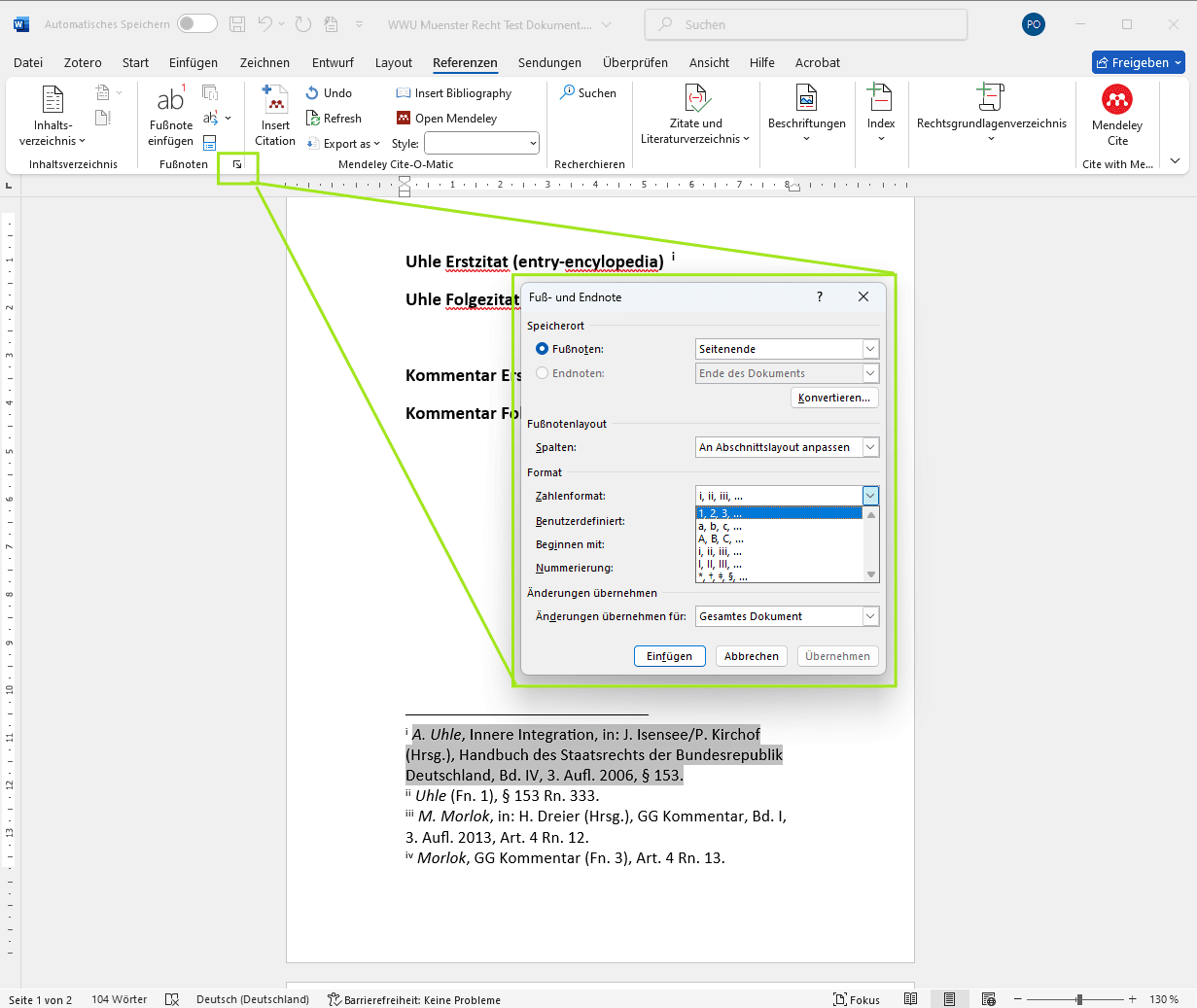
With these simple steps, you can customise the footnote numbering to suit your needs, whether in a single section or across the entire document, the format of the numbering and more.
Weitere typische Fragen zu Word und Zotero findest du in meinem Blog.