


With the update to version 7, Zotero has made a significant step forwards . But with this further development came a change in Zotero's architecture that surprised many users: ZotFile, one of the most widely used add-ons for Zotero, is no longer compatible.
But don't worry, there are alternatives - and even some of ZotFile's functions have been directly integrated into Zotero. In this blog post, we take a look at what the update brings and what new add-ons are available to fill the gap left by ZotFile.
What has changed?
Zotero 7 introduces numerous improvements and new features that make working with the software even more efficient. ZotFile has been an indispensable tool for many, especially because of its ability to automatically rename PDFs and move them to customised folders.
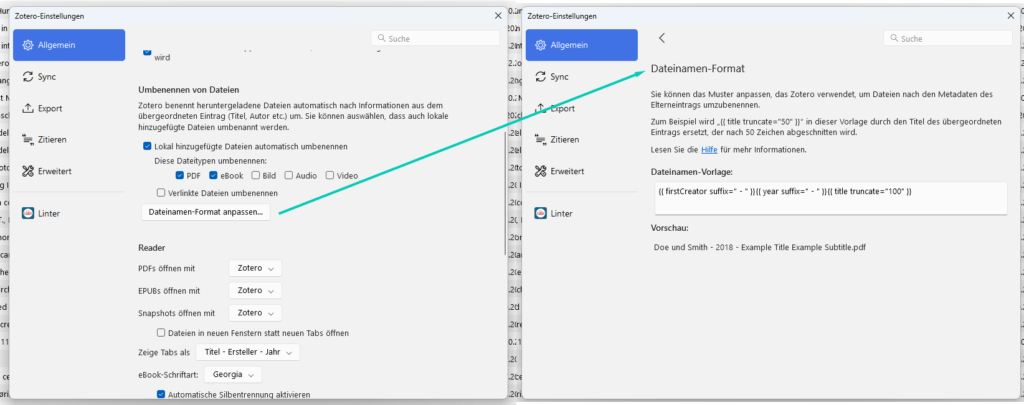
The good news is that some of these functions have now been integrated directly into Zotero. For example, it is now possible to automatically rename PDFs based on the metadata of the saved sources. The management of attachments has also been improved so that some of the functionality of ZotFile is already available without an additional extension. Detailed information on this topic can be found on the Zotero website ’File Renaming".
The new Zotero 7 file name format settings
Alternative to ZotFile for Zotero
However, for those who do not want to do without the full functionality of ZotFile, there is now a new and promising alternative: ZotMoov

Summary
The end of ZotFile may be disappointing for some users, but Zotero 7 brings a number of new features even without the add-on. For those who still need advanced options for organising their files and attachments, the ZotMoov an excellent alternative is available.
If you want to learn more about the best Zotero extensions you can integrate into your workflow, I recommend my blog post ’The top Zotero extensions I can't live without‘. There I present other indispensable tools for Zotero that can make your day-to-day work much easier.
Good luck organising your library with Zotero!