


How to change the footnote numbers in Microsoft Word

Many Zotero users use Zotero to insert footnotes into their documents and then wonder how they can customise the footnote numbering style. It is often assumed that this setting must be made directly in Zotero. However, it is actually a Microsoft Word function that controls the numbering of footnotes. In this article, I will explain how you can customise the footnote numbering in Word according to your wishes, independently of Zotero.

This allows you to change the numbering of your footnotes:

  1. First open the tab ’References‘ in the menu.
  2. Then click on the small arrow in the bottom right-hand corner of the ‘Footnotes’ group. This opens the dialogue box ’Footnote and endnote“.
  3. Make sure that the ‘Footnotes’ option is selected.
  4. In the ‘Number format’ field, you can now select how the footnote numbers should look.

To apply the settings, click on ‘Apply’. If you want to insert the current footnote at the position of your cursor, click on ‘Insert’ instead.
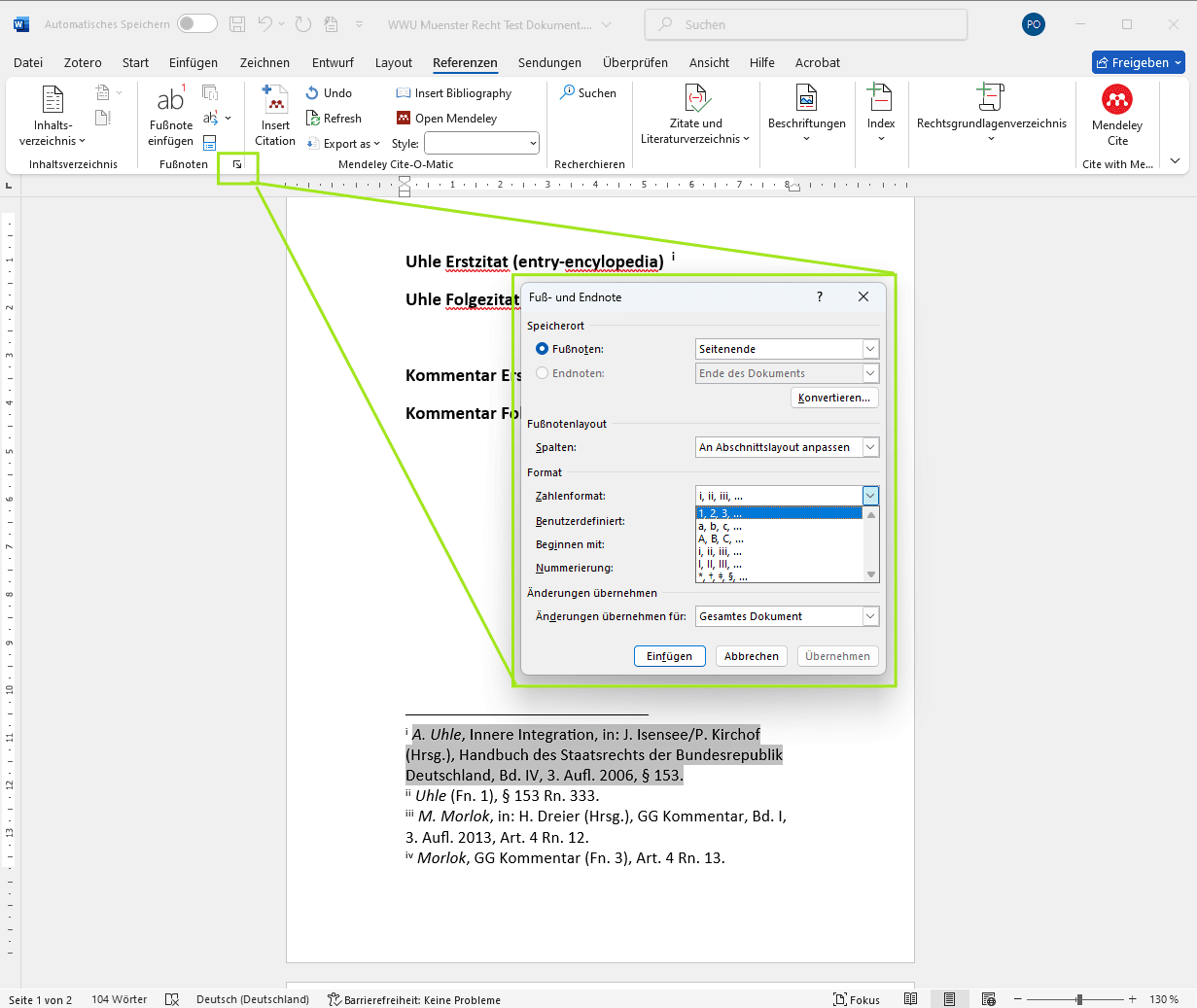
Dialogfeld Fuß- und Endnote in Microsoft Word zur Anpassung der Nummerierung

With these simple steps, you can customise the footnote numbering to suit your needs, whether in a single section or across the entire document, the format of the numbering and more.

Weitere typische Fragen zu Word und Zotero findest du in meinem Blog.


Further reading

Blog - Beaver AI for Zotero
Beaver: The AI research assistant that lives right inside Zotero
Beaver ist ein KI-Forschungsassistent, der als Seitenpanel direkt in Zotero lebt. Papers befragen, Textpassagen und Grafiken erklären lassen, Metadaten korrigieren, Bibliothek automatisch organisieren – alles ohne Zotero zu verlassen. Ein ausführlicher Blick auf Features, Kosten und warum die native Integration den Unterschied macht.
Die besten Zotero Plugins und Erweiterungen für Zotero - featured Image
The top Zotero extensions I can't live without
Want to get even more out of Zotero? Here are my top recommendations for Zotero plugins.
blog - Können CSL Zitierstile mit EndNote oder Citavi verwendet werden
Can CSL citation styles be used with EndNote or Citavi?
Find out in this article whether EndNote and Citavi .csl support citation styles.
Blog - 9 Tips fuer bessere ARbeiten mit Zotero
9 tips to work faster and cleaner with Zotero
Zotero can save you a tremendous amount of time in your academic work – if you use it correctly. In this article, you will find 9 tried and tested Zotero tips from real-world experience.

© Citation Styler. All rights reserved. 2026